# html.to.design alternatives
> html.to.design alternatives checked November 2026: Builder.io, Codia, Export to Figma and HTML to Figma by free imports. Sitepeel gives code, not layers.
Canonical page: https://sitepeel.dev/compare/html-to-design-alternatives/
The main html.to.design alternatives are Builder.io’s Figma plugin, Codia Web2Figma, Export to Figma and HTML to Figma. html.to.design gives 10 free imports, then 10 a month with a free account; Pro is $12 a month billed yearly. Sitepeel gives you HTML, a Clone prompt and a DESIGN.md, not Figma layers.
Published: 2026-11-05
Facts and prices checked: 2026-11-05
Tool used in this guide: [Website cloner](https://sitepeel.dev/website-cloner/index.md)
Free website tool for this task: [Website to HTML](https://sitepeel.dev/free-tools/website-to-html/index.md) (https://sitepeel.dev/free-tools/website-to-html/)
## In short
- 10 free a month: Codia or Export to Figma
- Pixel or editable modes: HTML to Figma
- Code, a prompt and a DESIGN.md, not layers: Sitepeel
## The short list
html.to.design has 700,000 Chrome users and a 4.5 rating. People look elsewhere for more free imports, a lower price, or because the next step is code and not Figma.
html.to.design alternatives compared
| Tool | Best for | Price | Works in |
| --- | --- | --- | --- |
| Codia Web2Figma | A free Figma plugin with viewports | 10 free credits a month; Pro on its site | Figma, Chrome |
| Export to Figma | A low price, paste into Figma | 10 exports a month free; Pro $1 a month at launch | Chrome, Figma |
| HTML to Figma | Pixel or editable modes | 10 manual imports once; $12 a month or $96 a year | Figma |
| Sitepeel | HTML, a prompt and a DESIGN.md | Free web tools; extension free to start, paid once | Chrome extension and web |
| Builder.io | A free import, paid extras | Free features with no card; premium extras | Figma, Chrome |
| html.to.design | Whole pages as editable layers | 10 a month free; Pro $12 a month billed yearly | Figma, Chrome |
Good to know: Checked on November 5, 2026 on each product’s own site and store page. “No” means we couldn’t find it there. We make Sitepeel.
## 1. Codia Web2Figma
Paste a link, pick desktop, tablet or mobile, and Codia rebuilds the page as editable text, images and frames. It runs on Figma’s free plan, and a Chrome extension captures pages behind a login.
## 2. Export to Figma
A Chrome extension that captures a page or an element, then you paste it into Figma as layers. The free plan has 10 exports a month, and Pro is unlimited at an introductory price.
## 3. HTML to Figma
A Figma plugin with no extension: paste HTML, or capture a public link in Pixel or Editable mode. Its free trial covers pasted HTML only, and link capture needs a license. It says editable results can need cleanup.
## 4. Sitepeel
Sitepeel doesn’t make Figma layers. It gives you the page’s HTML and CSS, a Clone prompt that rebuilds it with AI, a DESIGN.md and its files. Pick it when the next step is code.
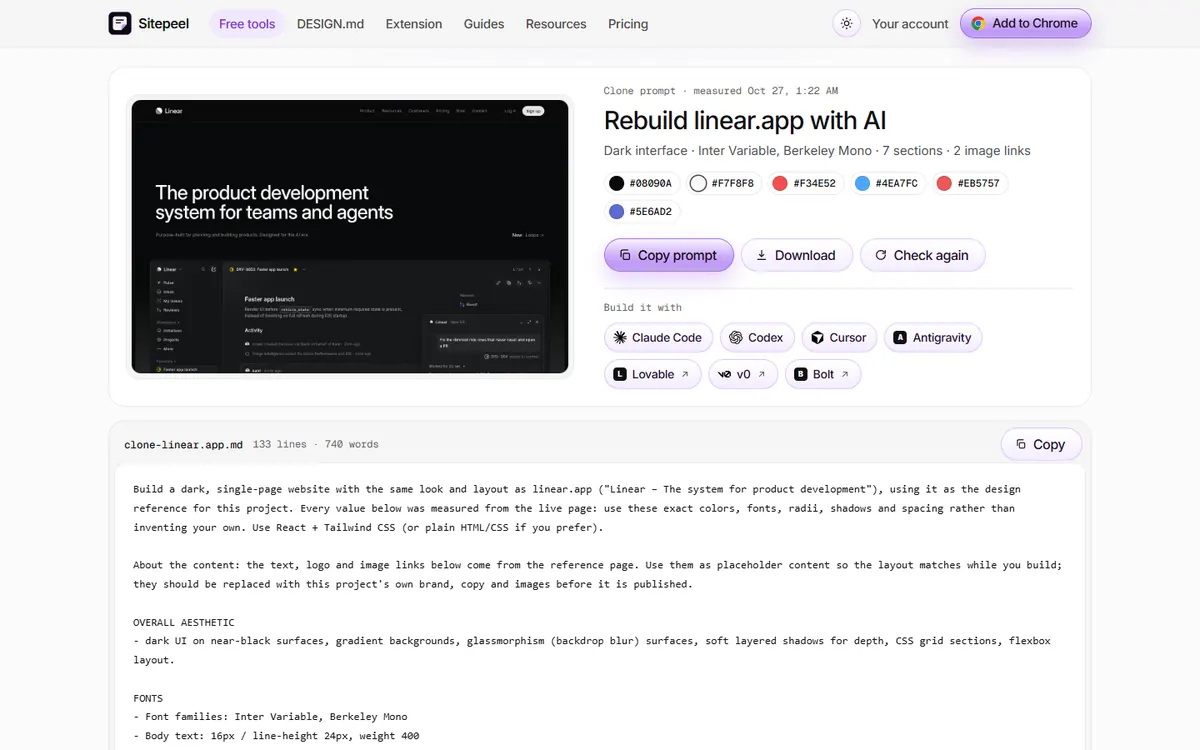
Sitepeel’s free Clone prompt on linear.app.
## When html.to.design is the better pick
- You want a whole page in Figma with auto layout and styles
- You import many links or files at once on Pro
- You want several viewports and themes in one import
- You capture pages behind a login with its Chrome extension
## Which one should you pick?
**Verdict:** For layers in Figma, html.to.design is the one to beat. For a free monthly allowance, try Codia or Export to Figma. If your next step is code or AI, use Sitepeel.
- [Save a page as HTML and CSS, free](https://sitepeel.dev/free-tools/website-to-html/index.md)
- [Sitepeel Chrome extension](https://sitepeel.dev/extension/index.md)
## Questions and answers
### Is html.to.design free?
Yes, for 10 imports, then 10 a month with a free divRIOTS ONE account, no card needed. Pro is $12 a month billed yearly or $18 monthly, with a fair use cap of 1,000 imports per 30 days.
### What is a free alternative to html.to.design?
Codia Web2Figma has 10 free credits a month, Export to Figma has 10 free exports a month, and Builder.io’s plugin has free features with no card.
### Does Sitepeel import websites into Figma?
No. Sitepeel gives you HTML and CSS, a Clone prompt, a DESIGN.md and the page’s files. For editable Figma layers, use one of the plugins here.
### Can these copy a page behind a login?
html.to.design and Codia say their Chrome extensions can. HTML to Figma takes pasted HTML from your own browser. Sitepeel’s Chrome extension works on signed-in pages too, as code.
## Further reading
- [html.to.design](https://html.to.design/home)
- [html.to.design: Pro plan](https://html.to.design/docs/pro-plan)
- [html.to.design on the Chrome Web Store](https://chromewebstore.google.com/detail/htmltodesign/ldnheaepmnmbjjjahokphckbpgciiaed)
- [Codia: HTML to Figma](https://codia.ai/html-to-figma-design)
- [Export to Figma](https://www.exporttofigma.com/)
- [HTML to Figma: pricing](https://html2design.com/pricing)
- [Builder.io: website to Figma (August 2025)](https://www.builder.io/blog/html-to-design)
## Related pages
- [Sitepeel vs html.to.design](https://sitepeel.dev/compare/sitepeel-vs-html-to-design/index.md): Sitepeel vs html.to.design, checked November 2026: a website as editable Figma layers, or as code, a prompt and a DESIGN.md. Free limits, prices, other tools.
- [Bring a website into Figma](https://sitepeel.dev/guides/website-to-figma/index.md): Bring a website into Figma with an editable import or a screenshot. Then check fonts, images, layers and mobile layouts before making components.
- [same.new alternatives](https://sitepeel.dev/compare/same-new-alternatives/index.md): same.new alternatives checked November 2026: Sitepeel’s Clone prompt, Lovable’s website import, Anima and the open source ditto, with their current free limits.