

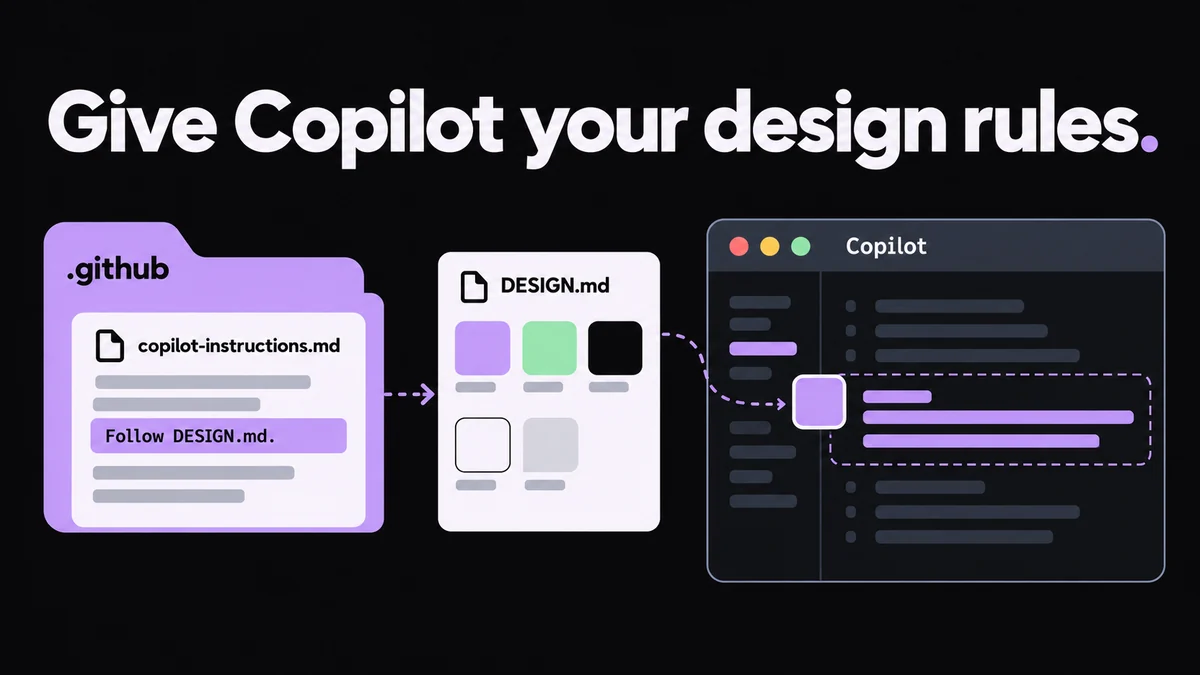
Which Copilot instruction file to use
Copilot sends every instruction file that applies, so keep design rules in one place to avoid conflicts.
| File | Applies to | Read by |
|---|---|---|
| .github/copilot-instructions.md | The whole repository | Copilot Chat, cloud agent, code review and Copilot CLI |
| .github/instructions/NAME.instructions.md | Files matching applyTo | Chat in VS Code, Visual Studio and JetBrains; cloud agent; code review on GitHub.com; Copilot CLI |
| AGENTS.md (the nearest one wins) | Its folder and below | Cloud agent, Copilot CLI, Copilot Chat in VS Code, code review on GitHub.com |
Sample instructions file for UI code
Save this as .github/instructions/design.instructions.md. Separate several applyTo patterns with commas. In VS Code, relative link paths resolve from the instructions file, so ../../DESIGN.md points at the repository root.
TipAdd excludeAgent: "code-review" to the front matter if you don’t want code review to apply these rules.
---
applyTo: "**/*.tsx,**/*.css"
---

# UI design rules

Follow [DESIGN.md](../../DESIGN.md) for all UI work.

- Use its color, typography, spacing and radius tokens. No new hex values.
- Reuse existing components and follow its Do's and Don'ts.
- If DESIGN.md has no rule for a case, say so instead of inventing one.
Use AGENTS.md for Copilot cloud agent
Copilot cloud agent and Copilot CLI read AGENTS.md files anywhere in the repository; the nearest one in the folder tree takes precedence. A single CLAUDE.md or GEMINI.md in the root works too. If Codex or Cursor share the repository, put the UI section in AGENTS.md once.
Check that Copilot followed DESIGN.md
- In Copilot Chat, expand References above the response and look for your instructions file
- Ask which DESIGN.md tokens it used, and search the diff for new hex values
- Compare the page with DESIGN.md at phone and desktop widths
- Code review reads instructions from the pull request’s head branch, not the base branch